Built-in Templates
UVerify ships with the built-in templates below. You activate a template by setting the uverify_template_id field in your certificate metadata at notarization time.
default
The standard certificate view. Used when no uverify_template_id is specified.
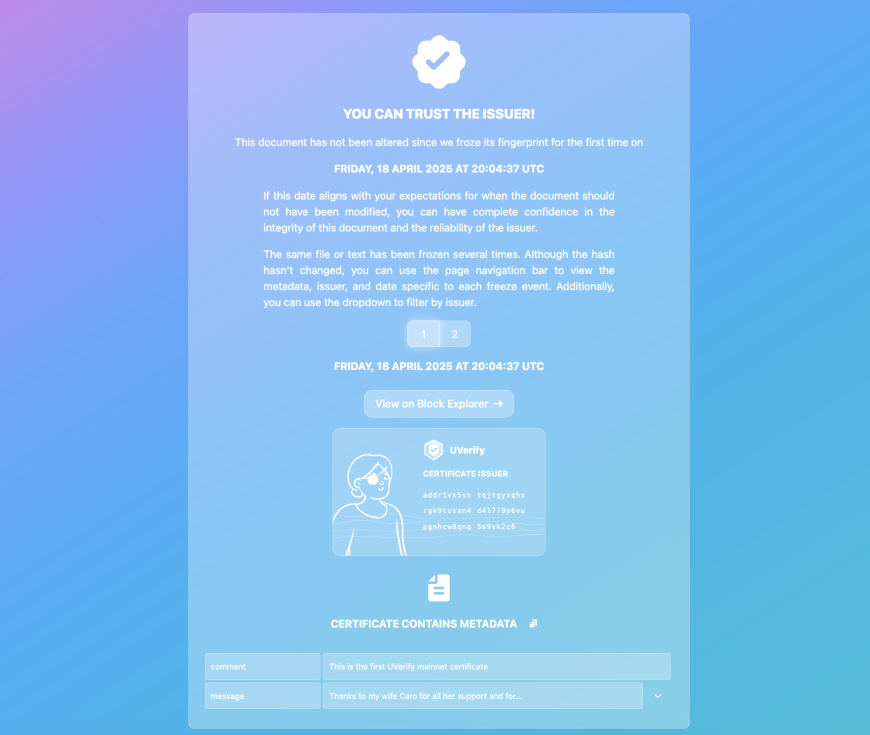
What it shows:
- Verification status (verified / not found / error)
- Metadata viewer (all on-chain metadata fields)
- Issuer identity card with Cardano address
- Block explorer link to the transaction
- Pagination if the same hash was notarized multiple times
- First notarization timestamp
Metadata fields: any key-value pairs you include are shown in the metadata viewer.
monochrome
Identical to default in behaviour and layout, but with a monochrome colour scheme. Useful for document-focused contexts where a neutral look is preferred.
Activate:
{ "uverify_template_id": "monochrome" }diploma
A formatted diploma certificate layout. Designed for academic credentials, awards, and formal certifications.
What it shows:
- Institution name (from
issuer) - Recipient name (revealed via
?name=URL parameter) - Degree or award title (from
title) - Optional description (from
description) - Optional decorative background pattern (from
pattern) - Blockchain verification proof
Required metadata fields:
| Field | Description |
|---|---|
uverify_template_id | Must be "diploma" |
issuer | Name of the issuing institution |
uv_url_name | SHA-256 hash of the recipient’s name (plain value passed via ?name= URL parameter — never stored on-chain) |
title | Degree, award, or certification title |
Optional metadata fields:
| Field | Description |
|---|---|
description | Additional text or HTML displayed below the title |
pattern | SVG pattern string for the certificate background |
uverify_update_policy | Controls subsequent updates. Default: first (initial issuance is permanent) |
Privacy note: the uv_url_* convention stores only a hash on-chain. The plain value is appended as a URL parameter when sharing the verification link and is never written to the blockchain.
Example:
{
  "uverify_template_id": "diploma",
  "uverify_update_policy": "first",
  "issuer": "University of Example",
  "uv_url_name": "<sha256('Jane Doe')>",
  "title": "Master of Science in Computer Science",
  "description": "Awarded with distinction, June 2024"
}
The easiest way to issue diplomas is via the SDK apps helper, which handles hashing and URL construction automatically — see TypeScript SDK → Application helpers.
digitalProductPassport
A full Digital Product Passport (DPP) layout for manufactured goods. Designed for EU-compliant product transparency, sustainability data, and end-of-life instructions.
What it shows:
- Product name, manufacturer, model, and GTIN
- Serial number (revealed via
?serial=URL parameter) - Origin, manufacture date, and brand colour
- Carbon footprint, recycled content, and energy class
- Warranty, spare parts availability, and repair information
- Recycling instructions
- Material composition (
mat_*keys) and certifications (cert_*keys) - Blockchain verification proof
Required metadata fields:
| Field | Description |
|---|---|
uverify_template_id | Must be "digitalProductPassport" |
name | Product name |
issuer | Manufacturer name |
gtin | Global Trade Item Number |
uv_url_serial | SHA-256 hash of the serial number (plain value passed via ?serial= URL parameter) |
Optional metadata fields:
| Field | Description |
|---|---|
model | Model identifier |
origin | Country of origin |
manufactured | Production date (ISO 8601) |
contact | Contact email or URL |
brand_color | Brand hex colour for UI theming (e.g. #1a56db) |
carbon_footprint | Carbon footprint value and unit |
recycled_content | Percentage of recycled content |
energy_class | Energy efficiency class |
warranty | Warranty period description |
spare_parts | Spare parts availability note |
repair_info | URL or description of repair instructions |
recycling | End-of-life recycling instructions |
mat_<key> | Material composition entry (e.g. mat_aluminum: "45%") |
cert_<key> | Certification entry (e.g. cert_ce: "CE Marking") |
uverify_update_policy | Controls subsequent updates. Default: restricted (issuer-only updates) |
Hash convention: the on-chain hash should be sha256(gtin + serialNumber) to uniquely identify this product instance.
Example:
{
  "uverify_template_id": "digitalProductPassport",
  "uverify_update_policy": "restricted",
  "name": "EcoCharge Powerbank Pro 200",
  "issuer": "GreenTech AG",
  "gtin": "04012345678901",
  "uv_url_serial": "<sha256('EC200-SN-20240815-00847')>",
  "model": "EC-200-2024",
  "origin": "Germany",
  "carbon_footprint": "1.2 kg CO₂e",
  "recycled_content": "38%",
  "energy_class": "A++",
  "warranty": "3 years",
  "mat_aluminum": "45%",
  "mat_recycled_plastic": "38%",
  "cert_ce": "CE Marking",
  "cert_rohs": "RoHS Compliant"
}
The easiest way to issue Digital Product Passports is via the SDK apps helper — see TypeScript SDK → Application helpers.
laboratoryReport
A laboratory report certificate layout. Designed for clinical and research labs issuing verifiable test results to patients or auditors.
What it shows:
- Laboratory name (from
issuer) and contact - Patient name (revealed via
?name=URL parameter) - Report ID (revealed via
?report_id=URL parameter) - Measured values (all
a_*keys displayed as a results table) - Auditable flag — when
true, all values are visible on the certificate - Blockchain verification proof
Required metadata fields:
| Field | Description |
|---|---|
uverify_template_id | Must be "laboratoryReport" |
issuer | Name of the issuing laboratory |
uv_url_name | SHA-256 hash of the patient’s name (plain value passed via ?name= URL parameter) |
uv_url_report_id | SHA-256 hash of the report ID (plain value passed via ?report_id= URL parameter) |
Optional metadata fields:
| Field | Description |
|---|---|
contact | Lab contact email or URL |
auditable | "true" or "false" — whether measured values are displayed on the certificate (default: "false") |
a_<key> | A measured value entry (e.g. a_glucose: "5.4 mmol/L") |
uverify_update_policy | Controls subsequent updates. Default: first (initial issuance is permanent) |
Hash convention: the on-chain hash should be sha256(reportId).
Example:
{
  "uverify_template_id": "laboratoryReport",
  "uverify_update_policy": "first",
  "issuer": "Berlin Medical Diagnostics GmbH",
  "contact": "results@bmd-lab.example",
  "uv_url_name": "<sha256('Sophie Wagner')>",
  "uv_url_report_id": "<sha256('BMD-2024-10-00123')>",
  "auditable": "true",
  "a_glucose": "5.4 mmol/L",
  "a_hba1c": "5.7%",
  "a_cholesterol": "4.9 mmol/L"
}
The easiest way to issue laboratory reports is via the SDK apps helper — see TypeScript SDK → Application helpers.
petNecklace
A lost-pet necklace certificate. When an NFC chip and the on-chain hash are combined, the owner’s contact information is revealed. No database, no server — GDPR-safe by design.
What it shows:
- Pet name and species/breed
- Owner name (revealed via
?owner_name=URL parameter) - Owner phone number (revealed via
?phone=URL parameter) - Optional note for the finder
- Blockchain verification proof
Required metadata fields:
| Field | Description |
|---|---|
uverify_template_id | Must be "petNecklace" |
pet_name | Name of the pet |
uv_url_owner_name | SHA-256 hash of the owner’s name (plain value passed via ?owner_name= URL parameter) |
uv_url_phone | SHA-256 hash of the owner’s phone number (plain value passed via ?phone= URL parameter) |
Optional metadata fields:
| Field | Description |
|---|---|
species | Pet species (e.g. "dog", "cat") |
breed | Breed description |
note | A short message for the finder |
uverify_update_policy | Controls subsequent updates. Default: restricted (only the issuer wallet can push updates, e.g. when the phone number changes) |
Example:
{
  "uverify_template_id": "petNecklace",
  "uverify_update_policy": "restricted",
  "pet_name": "Luna",
  "species": "dog",
  "breed": "Golden Retriever",
  "uv_url_owner_name": "<sha256('Max Mustermann')>",
  "uv_url_phone": "<sha256('+49 151 23456789')>",
  "note": "Luna is friendly and microchipped. Please call immediately!"
}
See the Pet Necklace use case for a full walkthrough.
socialHub
A social profile hub for physical items. Used in the Connected Goods use case.

What it shows:
- Product information
- A link tree that the item owner can update
- Wallet connect for claiming the item and minting an NFT
- Secret validation (checks
?secret=URL parameter against the on-chainhashed_secret)
Whitelist: this template is restricted to specific issuer addresses. Contact the UVerify team to set up a Connected Goods deployment.
Alias: linktree maps to this template for backwards compatibility.
productVerification
Product authentication with support for asymmetric NFC chip verification.

What it shows:
- Product image, name, manufacturer, production date
- Material information and serial number
- NFC chip verification status (if an NFC chip is present and tapped)
Required metadata fields:
| Field | Description |
|---|---|
uverify_template_id | Must be "productVerification" |
productName | Name of the product |
manufacturer | Manufacturer name |
Optional metadata fields:
| Field | Description |
|---|---|
productionDate | Date of production |
materialInfo | Material and care information |
serialNumber | Unique serial number |
imageUrl | URL to the product image |
Example:
{
  "uverify_template_id": "productVerification",
  "productName": "Titanium Road Frame Pro",
  "manufacturer": "ExampleBikes GmbH",
  "productionDate": "2024-11-15",
  "serialNumber": "TRF-2024-00842",
  "imageUrl": "https://cdn.example.com/products/trf-pro.jpg"
}
Whitelist: this template is restricted to specific issuer addresses. Contact the UVerify team to enable it for your account.
Asymmetric NFC: this template uses the @uverify/asymmetric-nfc library. The NFC chip holds a private key and signs a server challenge; the certificate page verifies the signature against the public key stored on-chain. This proves physical possession of the genuine chip, not just knowledge of the URL.
certificateOfInsurance
A Certificate of Insurance (COI) layout with a validity badge driven by the policy dates. All personal data uses the uv_url_* privacy pattern.
What it shows:
- Issuing insurance company and optional broker
- Insured name and address (revealed via URL parameters)
- Policy number, effective and expiration dates, with a VALID / EXPIRED badge
- Certificate holder details (revealed via URL parameters)
- Coverage limits (all
cov_*keys displayed as a table) - Additional insured and waiver of subrogation flags
Required metadata fields:
| Field | Description |
|---|---|
uverify_template_id | Must be "certificateOfInsurance" |
issuer | Issuing insurance company name |
uv_url_insured | SHA-256 hash of the insured’s name (plain value passed via URL parameter) |
policy_number | Policy reference number |
effective_date | Policy start date (ISO format, e.g. 2025-01-01) |
expiration_date | Policy end date (ISO format) — drives the VALID/EXPIRED badge |
Optional metadata fields:
| Field | Description |
|---|---|
producer | Insurance broker or agent name |
uv_url_insured_address | SHA-256 hash of the insured’s address |
uv_url_certificate_holder | SHA-256 hash of the certificate holder’s name |
uv_url_certificate_holder_address | SHA-256 hash of the certificate holder’s address |
additional_insured | "true" or "false" — whether the certificate holder is an additional insured |
waiver_of_subrogation | "true" or "false" — whether a waiver of subrogation applies |
cov_<key> | A coverage limit entry (e.g. cov_general_liability: "$2,000,000") |
uverify_update_policy | Controls subsequent updates. Default: restricted (issuer-only updates) |
The easiest way to issue certificates of insurance is via the SDK apps helper — see TypeScript SDK → Application helpers.
documentIntegrity
A file-drop verification page. The verifier obtains the original file (from a file share, an email attachment, anywhere), drops it onto the certificate page, and the page confirms whether the file’s SHA-256 hash matches the on-chain record. The file itself never leaves the verifier’s device.
Required metadata fields:
| Field | Description |
|---|---|
uverify_template_id | Must be "documentIntegrity" |
issuer | Name of the person or organization who certified the file |
title | Document title shown to the verifier (e.g. "Master Thesis") |
Optional metadata fields:
| Field | Description |
|---|---|
uv_url_filename | SHA-256 hash of the expected filename (plain value passed via ?filename= URL parameter) |
location | URL or path where the verifier can obtain the file |
file_size | File size in bytes |
file_type | MIME type or human-readable format description (e.g. "application/zip") |
file_hint | Note about the file (e.g. "ZIP archive, not password protected") |
description | Custom verification instructions. If omitted, auto-generated from filename and location |
uverify_update_policy | Controls subsequent updates. Default: first |
Hash convention: the on-chain hash is the SHA-256 of the file’s content.
agentReceipt
A machine- and human-readable receipt for AI agent commerce, following the Legal Context Protocol (LCP). It anchors the legal terms an agent accepted at transaction time, including dispute resolution details for LCP Level 4.
Required metadata fields:
| Field | Description |
|---|---|
uverify_template_id | Must be "agentReceipt" |
terms | HTTPS URL of the legal terms document (LCP: terms) |
transaction_id | Underlying commerce transaction ID |
Optional metadata fields:
| Field | Description |
|---|---|
termsFormat | Format of the terms document: markdown, json, pdf, plain, html |
acceptanceRequired | "true" when explicit acceptance was required — signals LCP Level 3 |
agent_name | Display name of the agent |
disputeResolution | JSON string: { method, jurisdiction, contact, clauseId, source, catalog } — signals LCP Level 4 |
returns | URL of a returns or claims API/process |
contact | JSON string: { legal, technical } |
api | URL of a legal context API — signals LCP Level 4 |
uverify_update_policy | Controls subsequent updates. Default: first |
The SDK apps helper issueAgentReceipt handles hashing and metadata assembly.
identityAuth
Renders KERI identity binding certificates (uverify_template_id: "IdentityAuth", note the capital I). AUTH certificates show a verified credential card with the KERI AID, ACDC schema, OOBI endpoint and a verification badge. REVOKE certificates show a revocation notice.
This template is part of the identity system — see Identity & Credentials for the concept and the IdentityAuth Certificate reference for all metadata fields.
tokenizableCertificate
A certified asset with NFT minting support. The issuer certifies an asset, and the designated owner can later redeem a CIP-68 NFT pair that proves ownership. Requires the tokenizable-certificate backend extension.
Metadata fields: asset_name, asset_class, issuer_name, ipfs_image, description, jurisdiction, asset_id, owner_address (Bech32 address of the wallet that will receive the NFT).
This template uses a custom transaction builder that calls the extension’s /build endpoint instead of the standard certificate flow. See the Tokenizable Certificate extension for the full lifecycle.
fractionizedCertificate
A fractionalized asset certificate: the certified asset is split into a fixed supply of fungible tokens that multiple wallets can claim. Requires the fractionized-certificate backend extension.
Metadata fields: asset_name, asset_class, issuer_name, ipfs_image, description, total_amount, asset_name_hex, init_utxo_tx_hash, init_utxo_output_index, claimants (comma-separated hex payment key hashes, empty for open access).
See the Fractionized Certificate extension for the full lifecycle.
tadamon
A branded certificate template built as a proof of concept with the Tadamon UNDP program.
Whitelist: restricted to authorized Tadamon issuer addresses. Not available for general use.